
Price Overrides
StoreHippo provides the feature of Price Overrides which allows you to change the pricing of your products for a number of specific conditions.
Price overriding is used to have a different set of pricing for different customers. For example, if you want to have different pricing of a product for B2B and B2C, you can show the price differently to B2B and B2C of the same product.
Available in Enterprise Plan and above.
Go to the Products > Price Overrides section in StoreHippo Admin Panel to manage the price overriding. You can add new, export, and import the prices for overriding.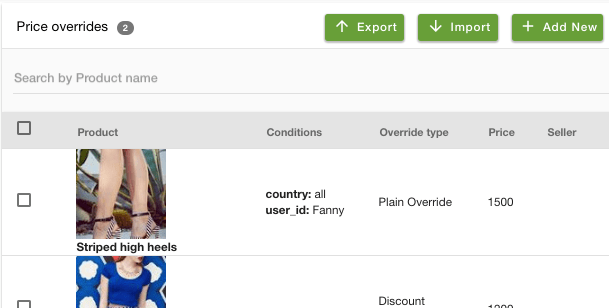
Adding a new Price Override Rule
Click on the Add New button in the top right corner to add the new price to override. The window appears with the following fields: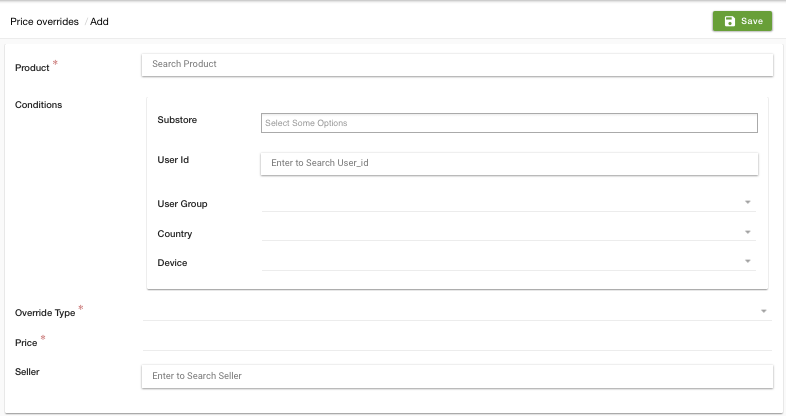
Product
Choose the product whose price you wish to override from the drop-down.
Conditions
The conditions in Price overriding are the factors for which you want to override the prices. There are following conditions:
- Substore: Specify the substores in which you wish to override the selected product's price.
- User Id: You can select the specific user to show the overridden prices to this specific user only.
- User Group: You can select a specific user group to show the overridden prices.
- Country: You can select a specific country to show the overridden prices.
- Device: You can select the specific devices on which the overridden prices will be shown.
Override Type
The override type is the type of price that is discounted. There are five override types:
Increment fixed
The increment fixed is the override type in which a specified amount is added to the actual price of the product.
Discount fixed
The Discount fixed is the override type in which a specified amount is deducted from the actual price of the product.
Increment percentage
The increment percentage is the override type in which a specified percentage of the actual price of the product is added to the price of the product.
Discount percentage
The Discount percentage is the override type in which a specified percentage of the actual price of the product is deducted from the price of the product.
Plain override
In Plain override, the amount specified simply overrides the actual product's price and becomes the final product's price.
Amount
The amount which will be used under Override Type.
Seller
Select a seller if you wish to apply this override rule for a specific seller's products only.