
Shipping settings
Go to Settings > Shipping Settings section in StoreHippo Admin Panel to access shipping settings.
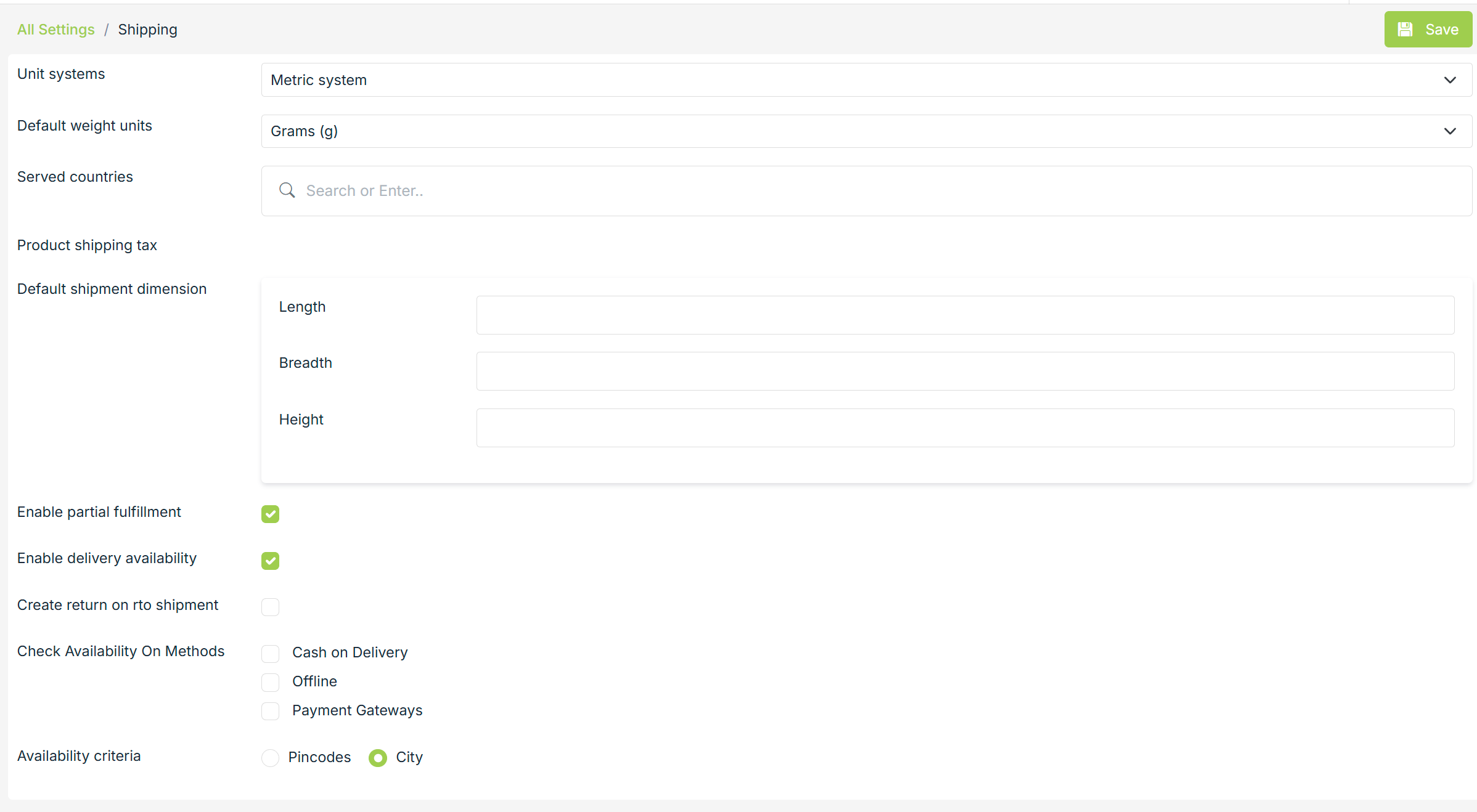
Shipping Setting contains the following fields:
Check Pin code Availability
It includes three options 'Cash on Delivery', 'Offline' and 'Payment Gateways'. To check the availability of the logistic services before placing an order, you can check the options. The services will be checked on the basis of serviceable pin codes mentioned by the respective logistic partners that are integrated with your store.
Unit System
You can choose your default unit system. Choose Metric system if you want to use meters or choose Imperial system if you want to use inch, feet, yard, etc. to measure length.
Default Weight Unit
You can choose your default weight unit. It can be Grams and Kilograms.
Served Countries
Choose the countries where you are providing the shipping services. You can select multiple countries here.
Default Shipment Dimension
You can also provide default shipment dimensions. Enter the length, breadth, and height of the shipment here.
Enable Delivery Availability
The Enable delivery availability option allows you to add/ upload the pin codes and areas for which you want to provide your services.
Enable Partial Fulfillments
Check this box, if you want to enable partial
Note: This option is available only in 'Business Plan' and onwards.
Availability Criteria
The availability criteria provide two options: Pin codes and Area. If you choose Pincodes, the pin code availability is enabled, and if you choose Area, the area availability is enabled.