
Logs
The logs section tracks events that take place in your store. Logs provide the history of the events in your store, determining when they took place, by whom, and other information. This includes events like actions performed on products, orders, payment transactions, themes, settings, notifications, etc.
You can access logs in the
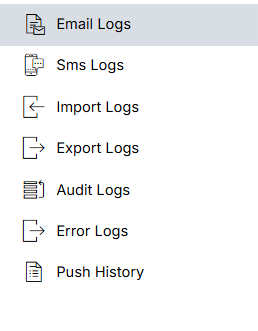
The logs section contains the following subsections:
Email Logs
Email logs keep the history of the email notifications sent. It contains the details like email, email ID, etc.
SMS Logs
SMS logs contain the history of the SMS notifications sent. The record includes information like the phone number on which the SMS is sent, the message, when the message was created, sent data, etc.
Import Logs
Import logs allow you to keep track of the import records. You can view the all the imported file details here.
Export Logs
Export logs allow you to keep track of the export processes in your store. You can view the exported file as well as its details in this section.
Audit Logs
Audit logs keep track of the changes that are made to the store. Each record includes a brief summary describing the event, when it happened, who made the changes, etc.
Push History
Push history allows you to keep track of the push notifications sent. It contains the history and all the details about push notifications.
Error Logs
Error logs allow you to keep track of the errors that you get in your store while executing any hook or command.