
User Wishlist
The Wishlist feature allows users to save products they are interested in and view them later. Admins can track and manage these wishlisted products from the panel.
Admin Panel → Users → User Wishlists
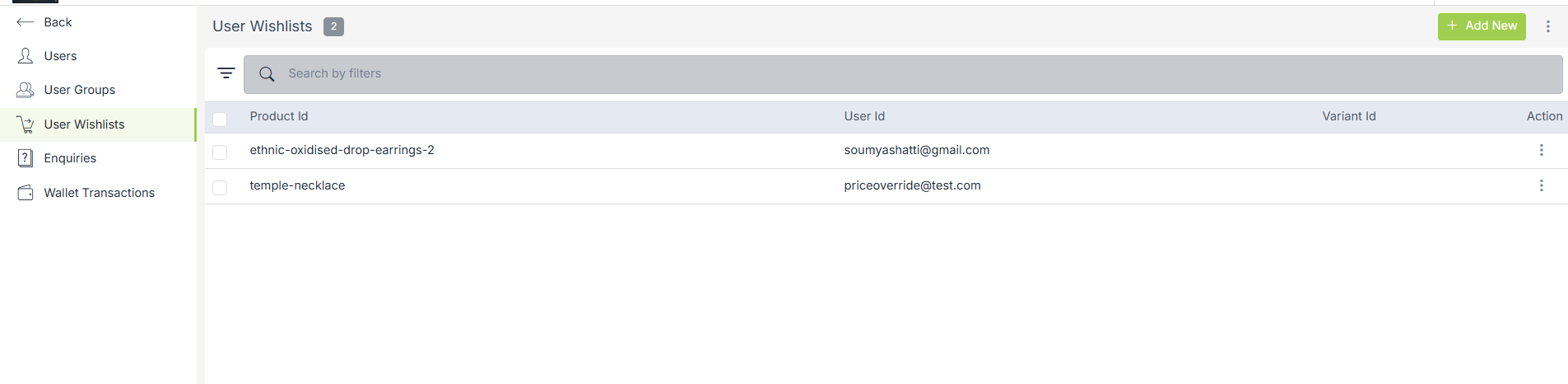
View User Wishlists
This section displays all products added to wishlists by users.
Details shown:
-
Product ID – The product added to the wishlist
-
User ID – Email ID of the user who added the product
-
Variant ID – Variant selected (if applicable)
-
Action – Additional options for the wishlist entry
Search & Filter Wishlists
-
Use the Search by filters bar to quickly find wishlists by:
-
Product ID
-
User ID
-
This helps in tracking user interest and popular products.
Add Wishlist Entry (Admin)
-
Click + Add New to manually add a product to a user’s wishlist.

-
Enter the user ID, product ID, list ID, and variant ID and click on submit.
Manage Wishlist Entries
-
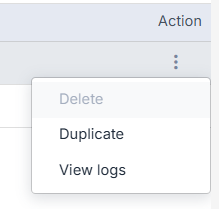
Use the Action (⋮) menu to manage individual wishlist records.
-
Admins can delete, duplicate, or view logs.